
You manage your MLSImport subscription in your account at mlsimport.com/my-account/.
The Dashboard
The Dashboard is the first screen after you log in. It shows your plan, the plugin download, your recent tickets and your billing. With no active subscription, it shows No plan and a View plans link.
The left menu
- Dashboard, the summary above.
- Onboarding Call, where you book your one-hour onboarding call.
- Support Tickets, your tickets, and New support ticket to open one.
- Video Tutorials, short walkthroughs for setting up, connecting and importing your MLS.
- Subscriptions, your plans. Open one to cancel it, change its payment method, or resubscribe.
- Payment methods, the cards used to bill your subscription, and Add card.
- Edit Account, your profile, email, password and billing address.
The subscription screen
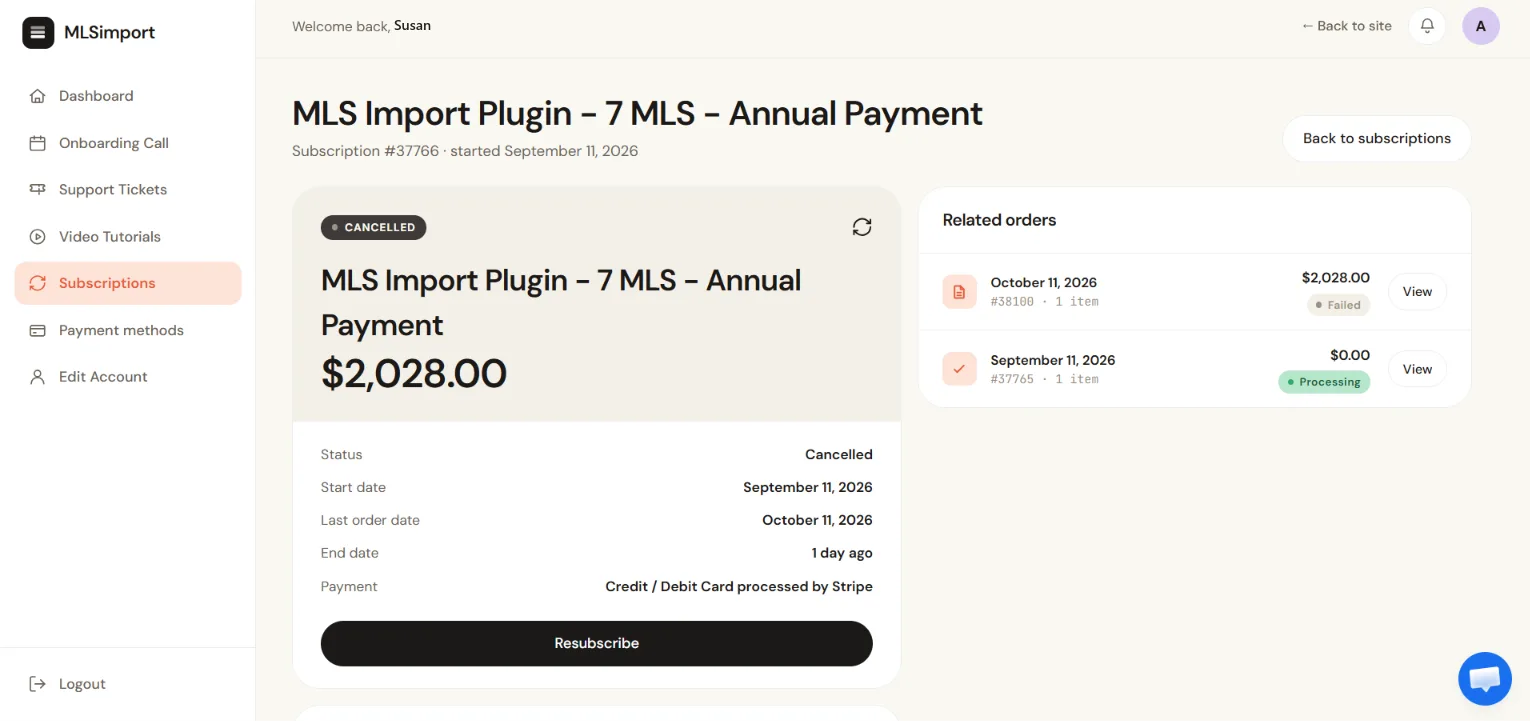
Click Subscriptions, then open your subscription. You see its status, start date, last order date, next payment date and end date. In the first month you also see the trial end date. The buttons for the subscription are below these details.
- Active: your plan bills normally.
- Pending cancellation: you cancelled, and the plan runs until the end of the period you already paid for.
- Cancelled: the period has ended and the MLS connection has stopped.
To stop your plan, read how to cancel MLSImport.
Reactivating a cancelled subscription
If you did not cancel the subscription yourself, the payment processor could not process the renewal payment. It tries the payment several times, and after the last try it cancels the subscription. Under Related orders, that renewal shows Failed.
To reactivate it:
- Log in at
mlsimport.com/my-account/. - Click Subscriptions in the left menu.
- Open the subscription marked Cancelled.
- Click Resubscribe.
To pay with a different card, add it in Payment methods.
Frequently asked questions
Where do I get an invoice for accounting?
Open your subscription under Subscriptions. Every charge, including each renewal, is listed under Related orders. Click View to open it.
